Like. I’m a firm believer that porn online shouldn’t be within kids reach (those “are you 18” checkboxes for life) but. Like. Ok first of all, just ban cp? It’s not hard? Cp is what got you into this mess just ban it. Second of all, you could increase the age of sign-up from 13 to 18. Third of all, you could do what deviantart does and just. Require birthdays at sign-up. If your blog is flagged as nsfw, you can’t interact with minors. You want to follow an nsfw blog? Prove you’re an adult. You’re an adult but don’t want to see nsfw content? Safe search (that actually works).
It’s not hard to make a functioning website, but staff doesn’t seem to want to do that.
I was just semi-complaining that I was still looking for a decent way to backup my +6k posts without having to use paid services or even just wordpress (which has an import from tumblr tool that asks for permission to access your blog and also make posts), when I decided to actually put some effort into my google search.
Results were positive: I have successfully backed up my blog*
*By which I mean: everything that I have ever posted. Not included: drafts, queue, likes, followers, following, comments, notes, chat.
I followed this method (word by word), and now have a 450 MB folder on my computer with the name of my blog on it containing:
1. Folder “Archive” (contains .html files listed by month) 2. Folder “Media” (contains gifs and images, mine has +1k files in it; might contain also audios but I have no way of confirming that because I’ve never reblogged an audio post from this blog) 3. Folder “Posts” (contains single .html files, each one a post; I have +4k files in it) 4. Folder “Theme” (contains only my avatar, but it might be a matter of if you have personalized themes or not) 5. .html file “Index” (by opening it it will give you the archive of your blog organized by month; clicking on a month will open up the archive for that month, and you’ll be able to read all the posts for that month as if you were on your blog**, except sans your theme graphic, with each page containing 50 posts)
**I can see gifs, links, embedded videos, tags, number of notes (but I can’t open up the notes, clearly), text is also correctly formatted.
So yeah, in case anyone wants a very quick way to back up their blog, it took me less than 10 minutes.
P.S. I didn’t have any issue, but to be on the safe side always check for spyware and virus threats before and after downloading anything.
this is actually really useful if you have an art blog full of years of work that you otherwise no longer have access to the original files. A lot of the art I have in the early days of my art blog are in that boat. I did this process JUST for that reason and I was pretty astonished at just how many pieces of media it backs up! (literally all of it) Drawings I didn’t even realize were sitting in my archive due to having been posted to text posts or undercuts, or untagged for years! It’s worth it if just for that, even if tumblr isn’t shutting down or deleting your blog.
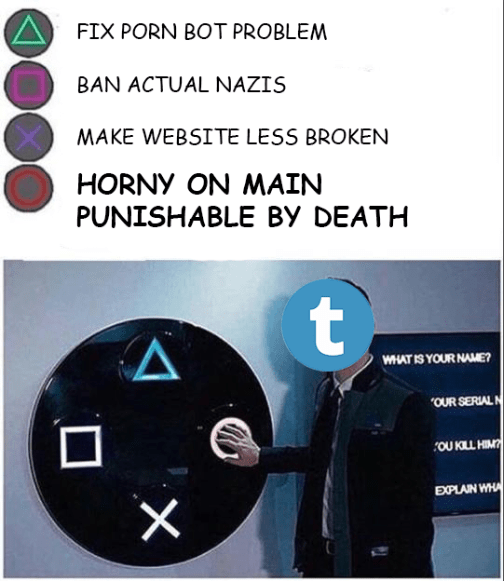
Tumblr was sold to Yahoo for a lot of money, but it turned out Tumblr was already in decline. A project in decline at a company in decline isn’t going to be well supported. A project in decline at a company in decline that gets banned from the Apple App Store is going to be told to either get back on the app store or be closed down.
I don’t think that the Tumblr staff has done this well, and I’m not inside that building, but my guess is that they have been told they either have to do things or they will be fired and their project closed down. And so they are doing the things with minimal support and minimal staff and I’m sure it sucks for them, because I imagine many of them feel that this is a betrayal of the identity of a place that they love very much.
We are seeing, real-time, how hard it is to sustain these massive cultural spaces, especially when they aren’t vanilla bullshit and so their path to paying for themselves is murky.
So, basically, fuck Apple for having no chill. And fuck the scum who were using Tumblr to post illegal content. I’m mad at those people, not the staff, who I’m sure are having a much worse day than me.
I don’t trust reddit because it’s the only social network whose users don’t hate the website they’re using. twitter users hate twitter. snapchat users hate snapchat. but reddit users will get a neck tattoo of the goofy little alien friend and name their first born son r/gaming
For the sake of moving your stuff to other places.
First, consider backing up your blog. They’ll send you a back up of every single post on your blog in a file via email, though it takes some time and be a really big file for some. You might not need or want it, depending on your blogging style.
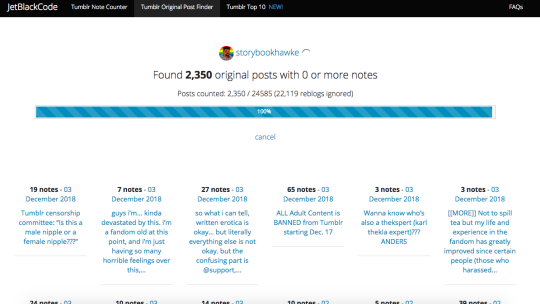
Tumblr Original Post Finder (jetblackcode.com/TumblrOriginalPostFinder/) ((not linked for obvious reasons for tblr’s censoring))
It will look like this when you type in your URL and press enter.
You can then go through and see which ones you’d want to save, or you can go back and filter by number of notes (for example, it can find all posts with 10+ or 100+ notes or whatever you desire). I plan on saving them to a document in order to post later to alternative websites, wherever we end up moving.
There’s not a lot of ways to speed the process up, but this is what I have. I hope it helps.







 Max Armenta's Archive